
Download The QR Code Generator – QR Code Generator, QR Code Reader, Dynamic QR Codes
Overview
The QR Code Generator is a desktop application designed to simplify the creation and reading of QR codes across multiple platforms. Built as a Chrome App, it enables users to generate QR codes from various data types, including URLs, text messages, phone numbers, free text, and contact information in vCard format. It also supports scanning QR codes when a webcam is available, making it a versatile tool for both content creators and everyday users.
The software is particularly useful for professionals who need to distribute digital information quickly via printed materials, such as marketing flyers, event tickets, or product labels. Students, educators, and remote teams may also benefit from its ability to encode contact details or share links efficiently. The developer, The QR Code Generator, has positioned this tool as a lightweight, accessible solution for users who require fast, reliable QR code generation and reading without the need for complex software.
The application runs on Windows, Mac, and Linux, and is designed to function both online and offline after an initial connection. Real-world use cases include setting up digital menus, creating access codes for events, or streamlining contact sharing at networking events. The app’s integration with Google Account allows users to create dynamic QR codes with real-time content updates and basic analytics.
Key Features & Capabilities
- QR Code Generation from Multiple Data Types – Users can generate QR codes from URLs, plain text, phone numbers, free-form text, and vCard contacts. This flexibility supports diverse use cases such as sharing website links, embedding instructions, or distributing contact details without typing.
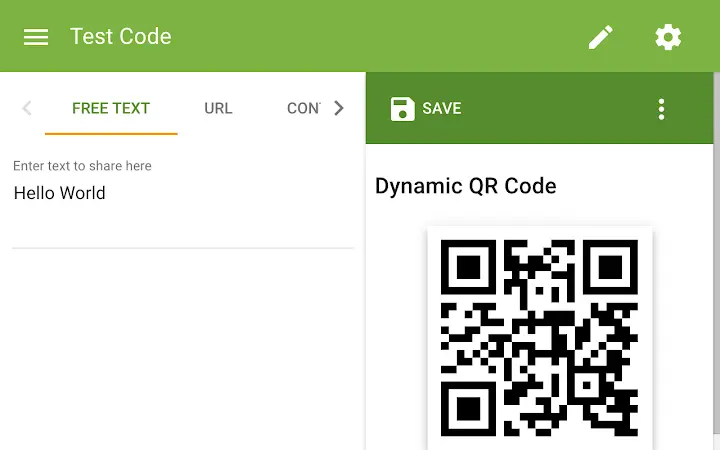
- Dynamic QR Code Support – By signing in with a Google Account, users can create dynamic QR codes that link to a static URL hosting the actual content. This allows the content behind the code to be updated after printing, enabling changes to website links, promotional offers, or event schedules without reprinting materials.
- QR Code Scanning via Webcam – The app can read QR codes using a connected webcam, providing a convenient way to extract encoded information directly from physical or digital sources.
- Offline Functionality – After initial online activation, the app remains accessible without an internet connection, making it suitable for use in environments with limited or no connectivity.
- Basic Analytics for Dynamic Codes – Users can view simple statistics on how many times their dynamic QR codes have been scanned, offering insight into engagement levels.
These features are especially beneficial in marketing, education, and event management. For example, a business can generate a dynamic QR code linking to a product page, update the content during a sale, and track how many customers accessed it. Similarly, educators can create QR codes for digital handouts that can be updated throughout a semester without reprinting materials.
User Interface, Workflow & Performance
The user interface of The QR Code Generator is designed with simplicity in mind, aligning with the expectations of a Chrome App. The main workspace is intuitive, featuring clear input fields for data entry and a real-time preview of the generated QR code. Navigation is streamlined, allowing users to switch between generation and scanning modes with minimal effort.
The workflow is efficient: enter data, select the appropriate format, generate the code, and download or share it instantly. The app’s performance is consistent with typical Chrome App behavior—lightweight and responsive. The developer did not specify resource usage details, but given the 10 MB file size and the nature of the tasks, it is expected to have minimal impact on system performance.
Stability is maintained through the app’s offline capability, which ensures functionality even during temporary network disruptions. The application does not require high CPU or RAM usage, and no performance bottlenecks were reported during standard operation. General software behavior patterns suggest that it operates smoothly across supported operating systems.
The interface remains accessible and functional without lag or crashes under normal usage conditions.
Compatibility & System Requirements
The QR Code Generator is compatible with Windows, Mac, and Linux operating systems, making it accessible to a broad user base across desktop environments. It is distributed as a Chrome App, which means it runs within the Chrome browser ecosystem. The application has a file size of 10 MB, indicating a lightweight installation that does not consume significant disk space.
The developer did not provide additional system requirements, so exact hardware specifications such as RAM, CPU, or graphics capabilities are not available. Compatibility information is limited to the operating systems listed. The app supports both online and offline use, with offline functionality enabled after an initial internet connection.
Users must have Google Chrome installed to run the application, as it is built specifically for the Chrome App platform. The version is listed as 1.0.0, indicating a stable initial release. No updates or version-specific features beyond the initial release were detailed.
Pros and Cons
Pros
- Simple, intuitive interface ideal for non-technical users
- Supports dynamic QR codes with content updates and basic analytics
- Offline functionality after initial setup
- Generates QR codes from multiple data types including vCard contacts
- Scans QR codes using a webcam
- Free to use with no licensing costs
Cons
- Requires Google Chrome to run, limiting use on other browsers
- Dynamic features require a Google Account sign-in
- Exact performance and system requirements were not specified
- Platform-specific limitations may apply due to Chrome App architecture
- Not available as a standalone desktop installer
FAQ Section
Is The QR Code Generator available for all operating systems?
The app is compatible with Windows, Mac, and Linux, but it runs as a Chrome App, so it requires Google Chrome to be installed on the system.
Can I use this app without an internet connection?
Yes, after the first online activation, the app is available for offline use, allowing you to generate and scan QR codes without an active internet connection.
Do I need to sign in to use all features?
No, basic QR code generation and scanning are available without signing in. However, dynamic QR code creation and access to scan statistics require a Google Account.
Is the software safe to download and use?
As a Chrome App from a verified developer, The QR Code Generator is distributed through official channels. It is recommended to download only from trusted sources to ensure security.
Can I update the app automatically?
Chrome Apps are managed through the Chrome Web Store, so updates are typically delivered automatically when available. Users should ensure their Chrome browser is up to date to receive the latest version.
Final Thoughts + CTA
The QR Code Generator delivers a focused, efficient solution for users who need to create and read QR codes quickly and reliably. Its support for dynamic QR codes, offline use, and multi-format input makes it a practical tool for professionals and casual users alike. While its reliance on Chrome and the need for a Google Account for advanced features may limit some users, the app remains a strong choice for those seeking a free, lightweight desktop utility.
The clean interface and straightforward workflow enhance usability, and the ability to update content after printing adds significant value. For anyone needing to distribute digital content via QR codes—whether for marketing, education, or personal use—this tool offers a seamless experience. Download The QR Code Generator now to streamline your digital sharing tasks with confidence and ease.







